
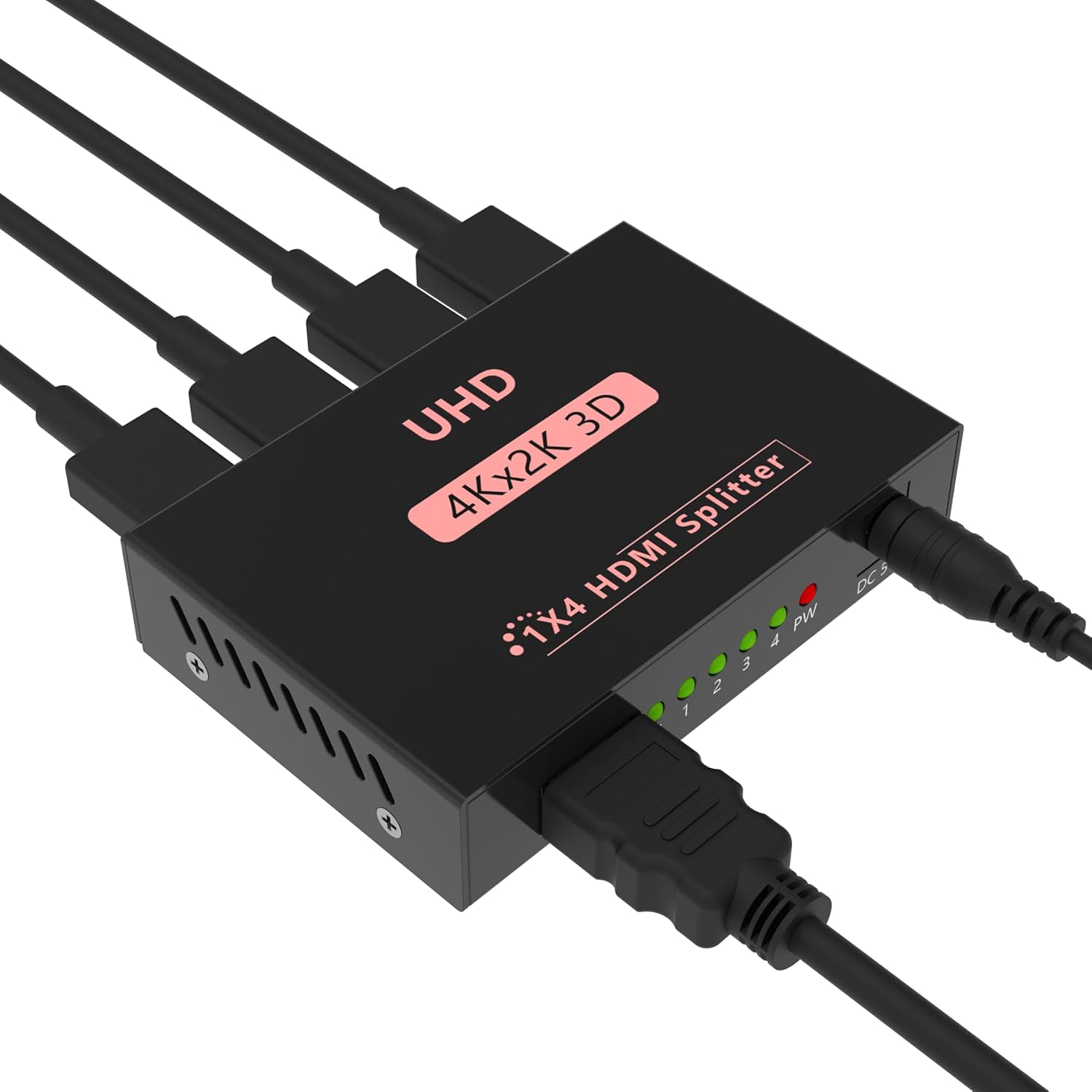
Sprolink LK5-H104 HDMI Splitter 1×4 Powered w/AC Adapter, 4K@30Hz 3D Full HD 1 in 4 Out Distributor for Fire TV Stick, PS5, HDTV, Xbox, Gaming Monitor
$18.99
Related Products







Product description


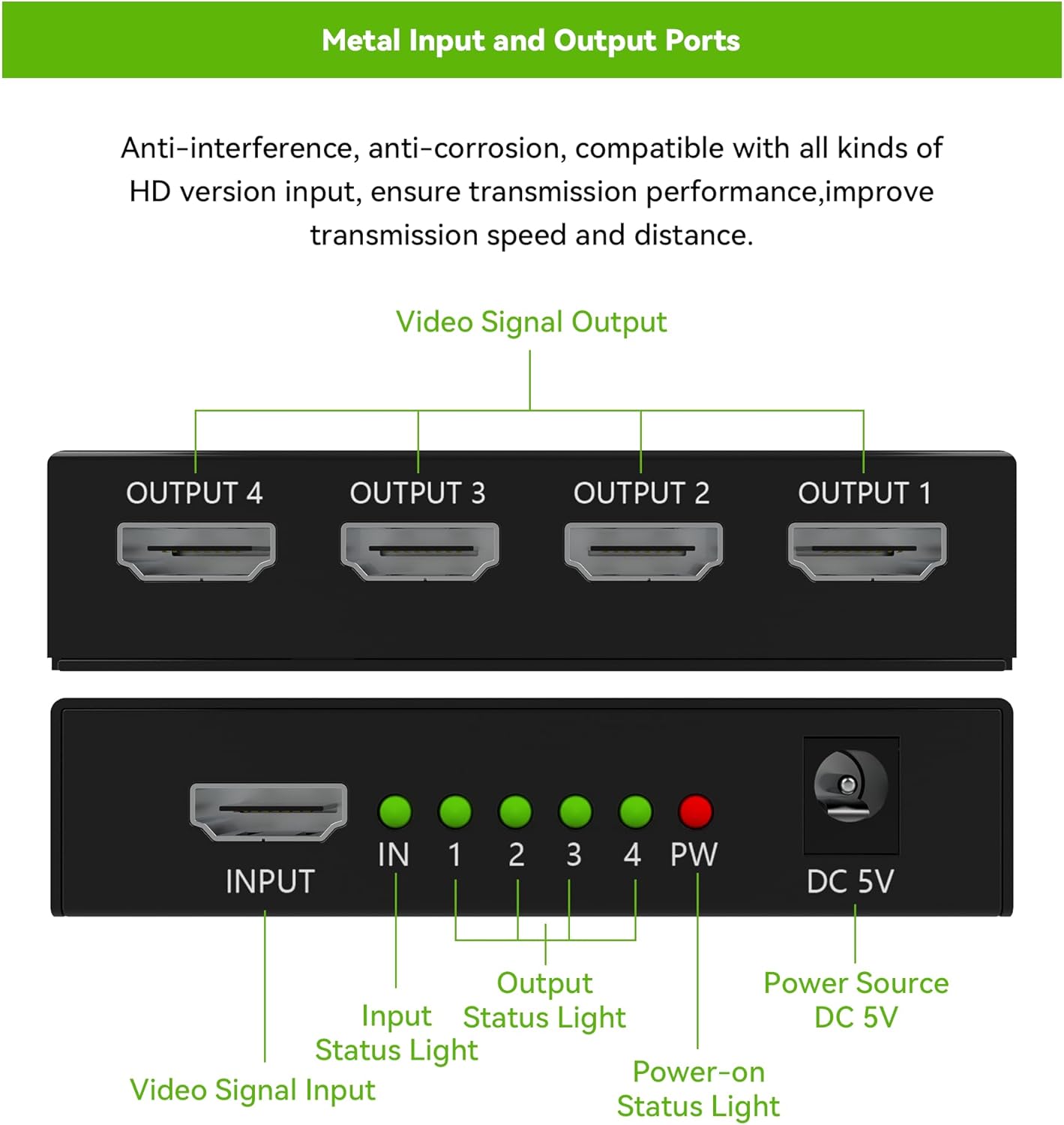
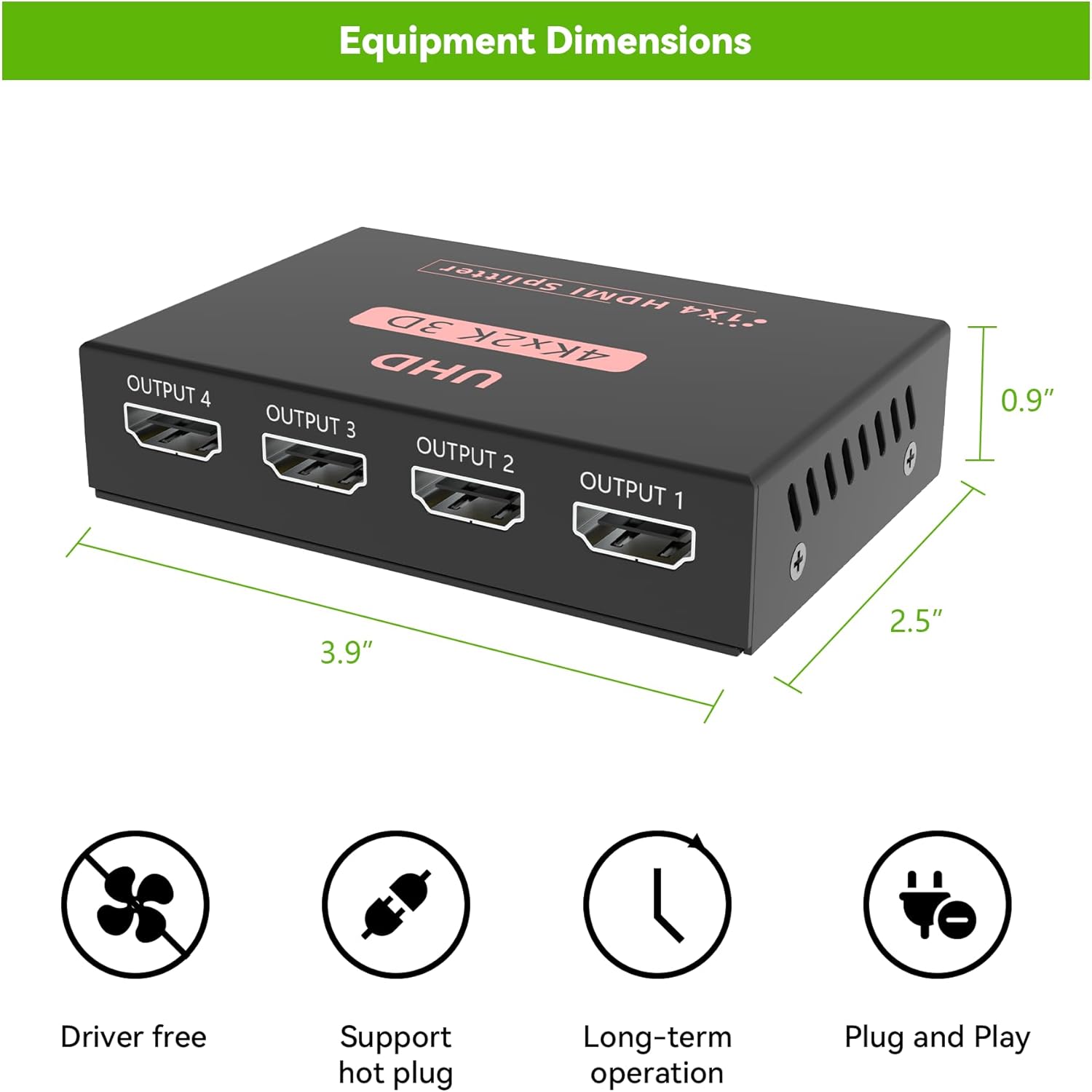
1×4 HDMI Mirroring System – Duplicates one HDMI input signal to four identical outputs simultaneously with zero latency or quality degradation; ideal for conference rooms, digital signage, and multi-display setups (Note: Not a bidirectional switcher)
4K Ultra HD @30Hz & Full 3D Support – Delivers crystal-clear 3840×2160 resolution, deep color (8/10/12-bit), and 1080p/3D compatibility; ensure input/output devices support 4K for optimal results
High-Fidelity Audio Transmission – Uncompressed passthrough for DTS-HD, Dolby TrueHD, DSD, DTS, Dolby-AC3, and all HDMI 1.4b audio formats without downsampling
Universal Compatibility – Works seamlessly with PCs, PS4/PS5, Xbox Series X/S, Blu-ray players, and cable boxes to HDTVs, projectors, and monitors (Requires HDCP 1.4; for HDCP 2.2 devices, use 8K splitters)
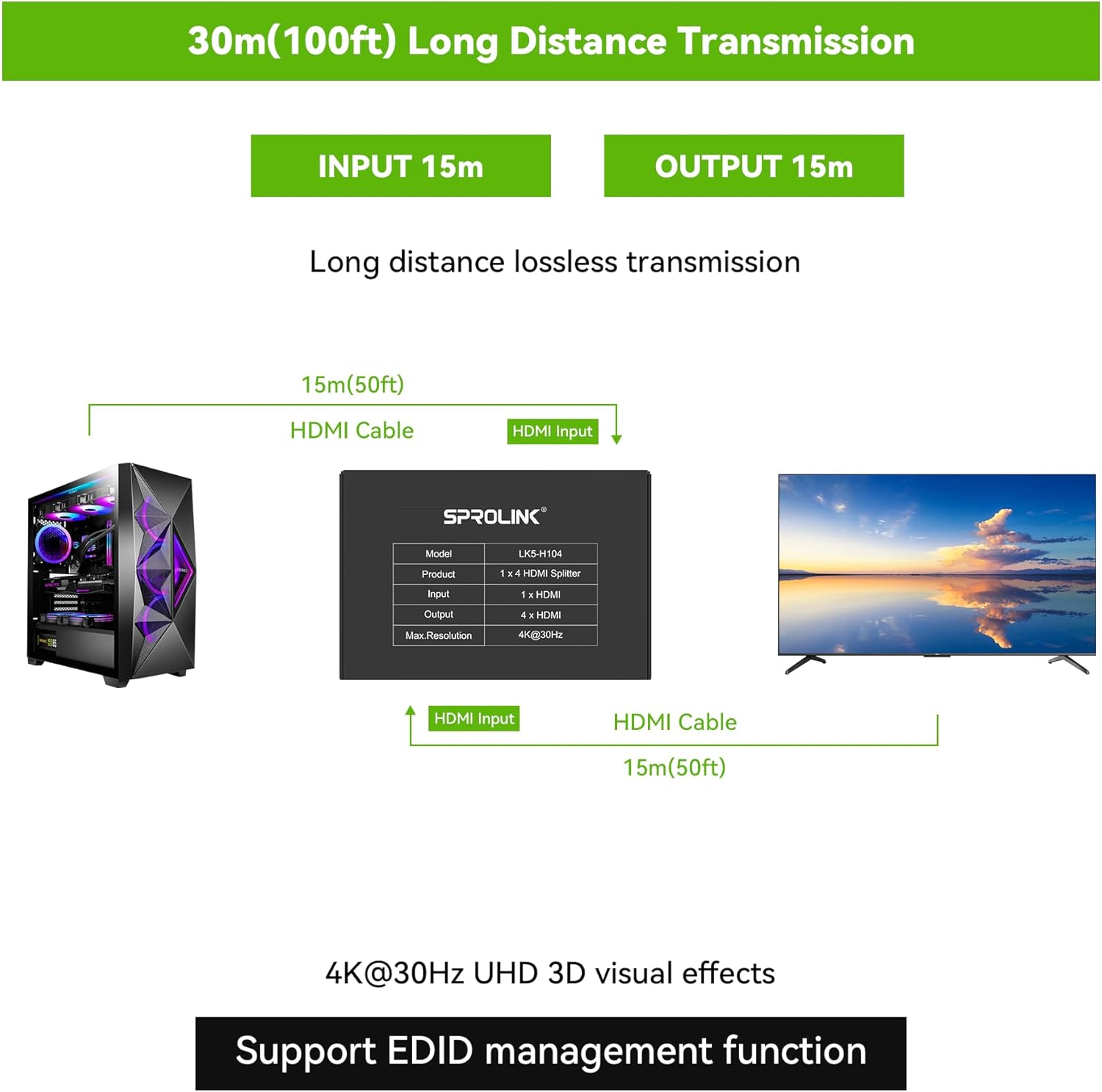
Cascade & Long-Distance Support – Extend signals up to 100ft via cascading splitters (input: 40ft + output: 60ft) using premium HDMI 2.0 cables for 4K stability
[
9 reviews for Sprolink LK5-H104 HDMI Splitter 1×4 Powered w/AC Adapter, 4K@30Hz 3D Full HD 1 in 4 Out Distributor for Fire TV Stick, PS5, HDTV, Xbox, Gaming Monitor
Add a review
$18.99
Christopher John –
Decent quality and works great
Very good
Olivia S. –
1 in 4 out HDMI Splitter – Clear signal to all 4 outputs – requires 5v barrel plug no HDMI included
This is a 1 input to 4 output HDMI splitter. Listed at up to 4k 30Hz it works well to deliver a clear video and audio signal signal to all 4 connected displays. Everything works just as it should providing 1 input a 4 way duplicate image. It does not extend displays or act as a switch; only mirrors. Included is the splitter, some instructions, and the 5v barrel power plug. The splitter box itself is made of a thin metal and feels very cheap and light, not staying placed under tension. The connections all feel sturdy but there really isn’t much to the overall weight or design. Simple to use and set up, just connect the HDMI input, power, and up to 4 outputs and it typically just works, sometimes with a slight initial delay when it first connects but it runs well otherwise. It sits just at $19 at the time of review and honestly it’s pretty OK, not a great deal but a fair value for what it is.
𝐿𝒾𝓋𝒾𝓃𝑔 𝓉𝒽𝑒 𝒹𝓇𝑒𝒶𝓂! –
Simple splitter that does the job, but know its limits
I set this up to mirror one source across multiple screens, and it worked right out of the box with very little effort. Everything is clearly labeled, and it’s basically plug in, connect cables, and it starts doing its thing.The biggest positive for me is how consistent the signal is once it’s powered. All four outputs show the same image without flickering or random dropouts. The included power adapter seems to help keep things stable, especially compared to passive splitters I’ve tried before.Picture quality looks clean at standard resolutions, and even at 4K it still looks sharp as long as the source matches what the splitter supports. That said, this is limited to 4K at 30Hz, so it’s not ideal for fast-paced gaming. I noticed motion isn’t as smooth compared to a direct connection, especially with higher refresh rate content.Another thing to keep in mind is that this mirrors displays only, not extend. Every screen shows the same thing, which is expected but worth being clear about. It also depends on the lowest capability display in the setup, so if one screen is older, everything adjusts down to match it.Build quality feels lightweight but not flimsy. It’s small enough to tuck away, and the ports hold cables securely without feeling loose.Overall, it’s a straightforward, no-frills splitter that works well for basic setups like duplicating a signal to multiple TVs or monitors. I’d recommend it for general use, just not for anyone needing higher refresh rates or more advanced features.
Aaron –
Perfect for My Security Camera Setup
I’m using this HDMI splitter with my security camera system, and it’s been working flawlessly. The setup was very easy, plug and play, and everything connected right away without any confusion.The functionality is exactly what I needed. I currently have one HDMI input from my DVR, and I’m splitting it to three screens using one HDMI cable and two wireless HDMI transmitters. I’ve had no issues at all. The signal stays strong and consistent across all displays.It’s very versatile and compatible with different setups, which made it perfect for my system. The powered adapter helps keep everything stable, and I haven’t experienced any signal loss or drop in quality.One thing to note is that the LED indicator lights are really bright, but that’s a small trade-off for how well it performs.
Incognito Mode –
Good connection, very clear signal.
It’s easy enough to install. The connections are all firm without being overly tight. The signal appears unaffected even with all ports used. HDMI is pretty much universal so it’ll work on any/most devices. Not a bad value for where it’s priced. Sound quality and brightness are showing good even after a few days of use.
Jim L –
Check compatibility
While I am sure its great for most monitors, it does not sense my Samsung wide screen correctly and therefore doesn’t let me use some higher resolution functions. Only directly plugging it in to my PS5 or PC alone will my monitor work correctly.
X –
Limited resolutions on Linux
So I wanted to use this to split a secondary display and a capture card on my Linux PC. Easy enough, fit into the hdmi port just fine and didn’t show any lag on the capture card. However, for whatever reason, this splitter (despite supporting multiple resolutions) only showed up as 1080p, and could not be adjusted. This wasn’t compatible with the 1600x900p monitor I wanted to use it with. I doubt you’d have these issues on Windows though, so the functionality was basically limited by the low-res monitor. All in all, good value, but only four stars as—while it did work with everything else—it didn’t work with the thing I actually got it for.
Roy Bradley –
Works great for my conference room
Using this to show presentations on four TVs. Setup was simple, and the image stays sharp. No lag issues so far.
otopon –
【1つの画面を4つに増やす】HDMI出力を4つに複製。最大で4つの画面に同じものを映せるわけですね。店頭のデモやディスプレイとか、会議やイベントや講演会やプレゼン、美術系のインスタレーションや舞台演出など、いろいろな使い方が想定できますね。個人では一つの映像をテレビ用と録画機用に分岐するということもできます。あるいはリビング用とキッチン用に同じコンテンツを流せば料理しながら家族交流も可能。楽しいものを分けあうというのは、それだけでなんだか幸せ気分になります。【制限】HDMIバージョンが1.4bなので、4K解像度ですと、リフレッシュレートを24~30Hzと低く設定しなければなりません。「対応してないわけではないよ」という程度の4K対応です。たとえば、FireTVの4K版の場合、リフレッシュレートが60Hzに設定できないと4K出力できないので、本製品に接続した場合は下位のFHD(1080P)で出力することになってしまいます。FireTVに限らず、基本、この製品はFHDで使うものだと思ったほうがいいです。4Kデフォの人ならHDMIバージョン2.x以降対応のスプリッターを買うべきでしょう。【使用の実際 ~ FireTVを分岐してみた】それで、FireTVのFHD版で、テレビ、モバイルディスプレイx2、プロジェクターの計4台に対して、出力してみました。配線は、本製品には含まれないので別途用意します。今回はベーシックに有線ケーブルです。接続しただけで、4台とも認識し、正常に出力できました。なかなか壮観ですw添付写真は版権上問題ない設定画面のものです。PrimeVideo、Hulu、Disney+などの有料コンテンツも、特に何事も無く正常に4画面出力できることを確認しました。画質などは、1台で使っている時と同じです。同品質のHDMI出力として分岐しています。もちろん音声も、4台同時に出ます。たとえばPCでデュアルディスプレイにする場合、音声の出力先を一つ選ぶ感じになりますが、本製品では音も等しく分岐され、4つそれぞれで鳴ります。【動作の際に気づいたこと】既に出力中の状態で、画面を追加するように配線すると、全体で仕切り直しのような停止→再開の動作が入ることがあります。【本製品の問題点】なんというか、繊細なところがあります。ちょっと持ち上げただけで電源が止まり出力が落ちることがありました。動作中は触らないほうがいい感じです。私に届いた個体の問題なのか、そういうものなのかは判別できませんが。【マテリアルとして】スプリッター本体、ACアダプター(電源)、説明書の紙きれ(英語)以上三点が箱に入っているという商品構成。本体にSPROLINKというブランド名はあるものの、箱にも説明書にも製造元や連絡先の表記は無し。中国製。ACアダプターは、丸ピン、5V2A、妙に軽い、製造元などの表記はこちらも無し。本体は金属製。機能は商品説明通りですが、品質面で過大な期待はしないほうがいいかもしれません。