
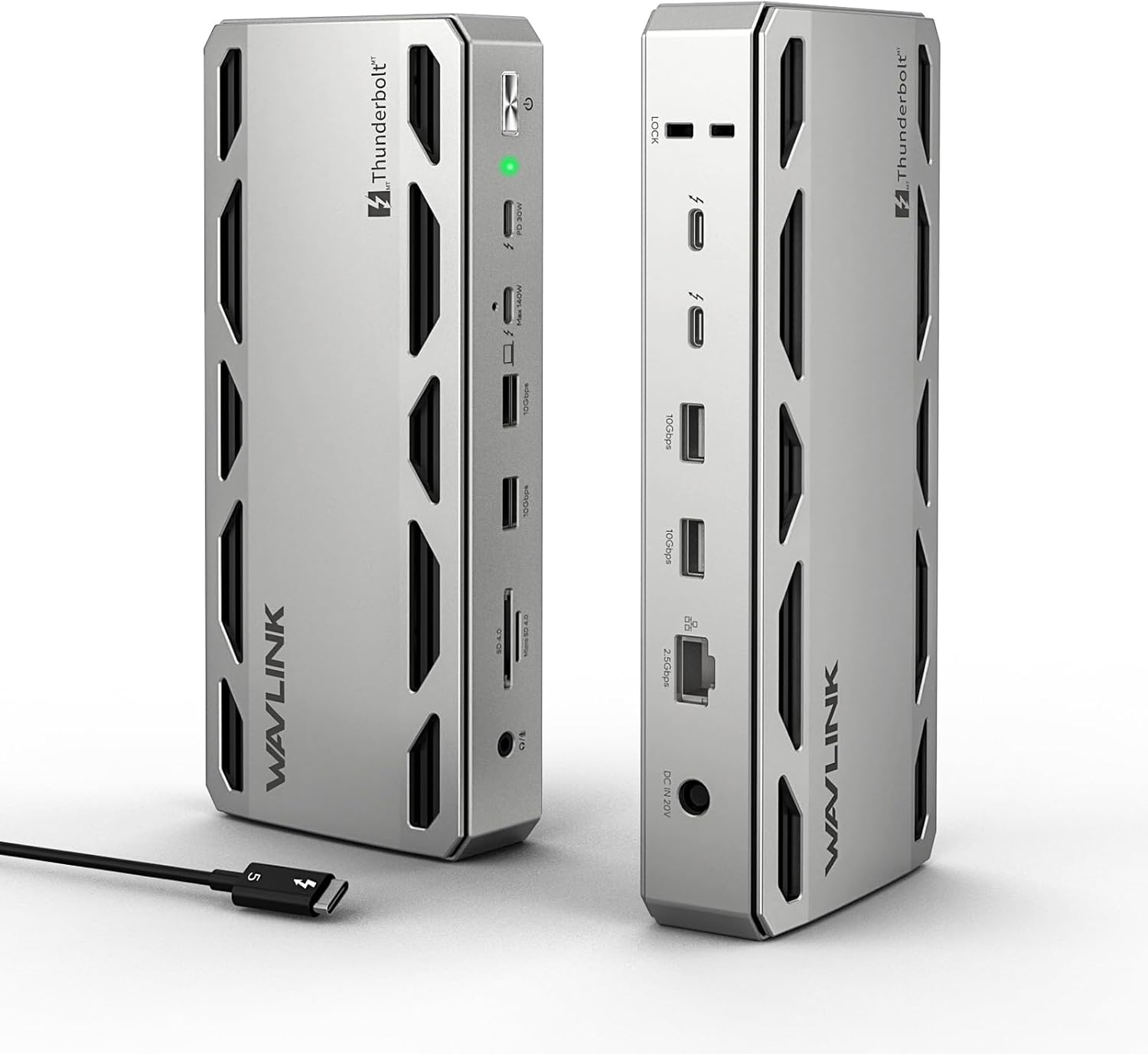
WAVLINK Intel Certified Thunderbolt 5 Dock, 12-in-1 TB5 Docking Station with 120Gbps Max Transfer, 140W PD, 2.5G Ethernet, 4X USB-A 3.2 Gen 2, SD4.0, for Windows 11/Mac OS 14.6 or Later TB5/4 Laptops
$299.99
Related Products






From the brand


WAVLINK docking station
WAVLINK Docking
WAVLINK USB C HUB

WAVLINK Laboratory

Warm Consultation

Modernized Factory
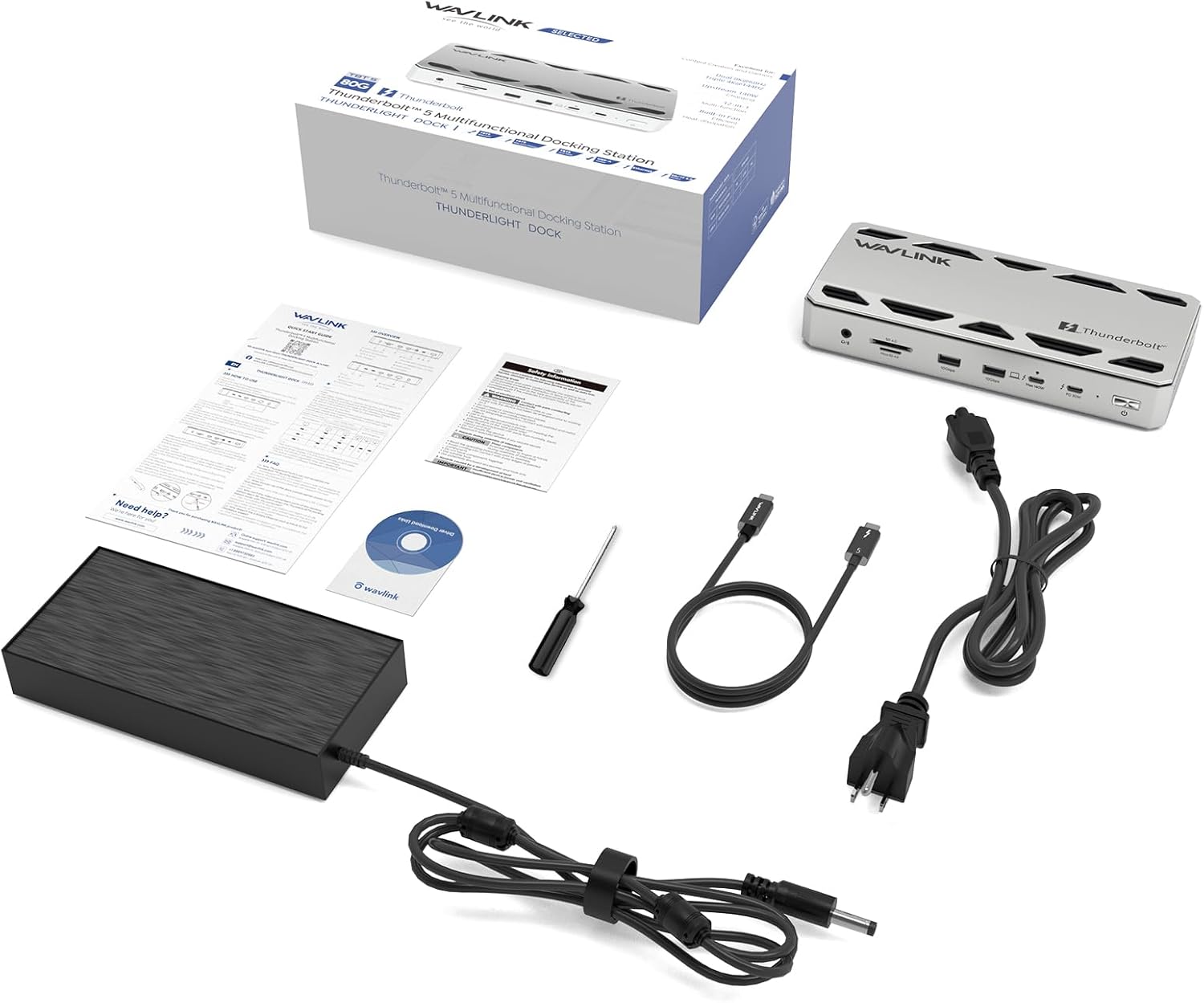
12-in-1 Thunderbolt 5 Dock – You may know about Thunderbolt 5, but have you ever experienced the latest Thunderbolt 5 technology dock? No? Try this, thunderbolt 5 dock! It is equipped with 1x Upstream Thunderbolt 5 Port (120Gb/s, 140W), 3x Downstream Thunderbolt 5 Ports (80Gb/s; PD15W;PD30W), 1x 2.5G RJ45 Ethernet, 4x USB-A 3.2, 1x SD 4.0, 1x 3.5mm Audio/Mic, 1x Kensington slot . Latest technologica, just start!
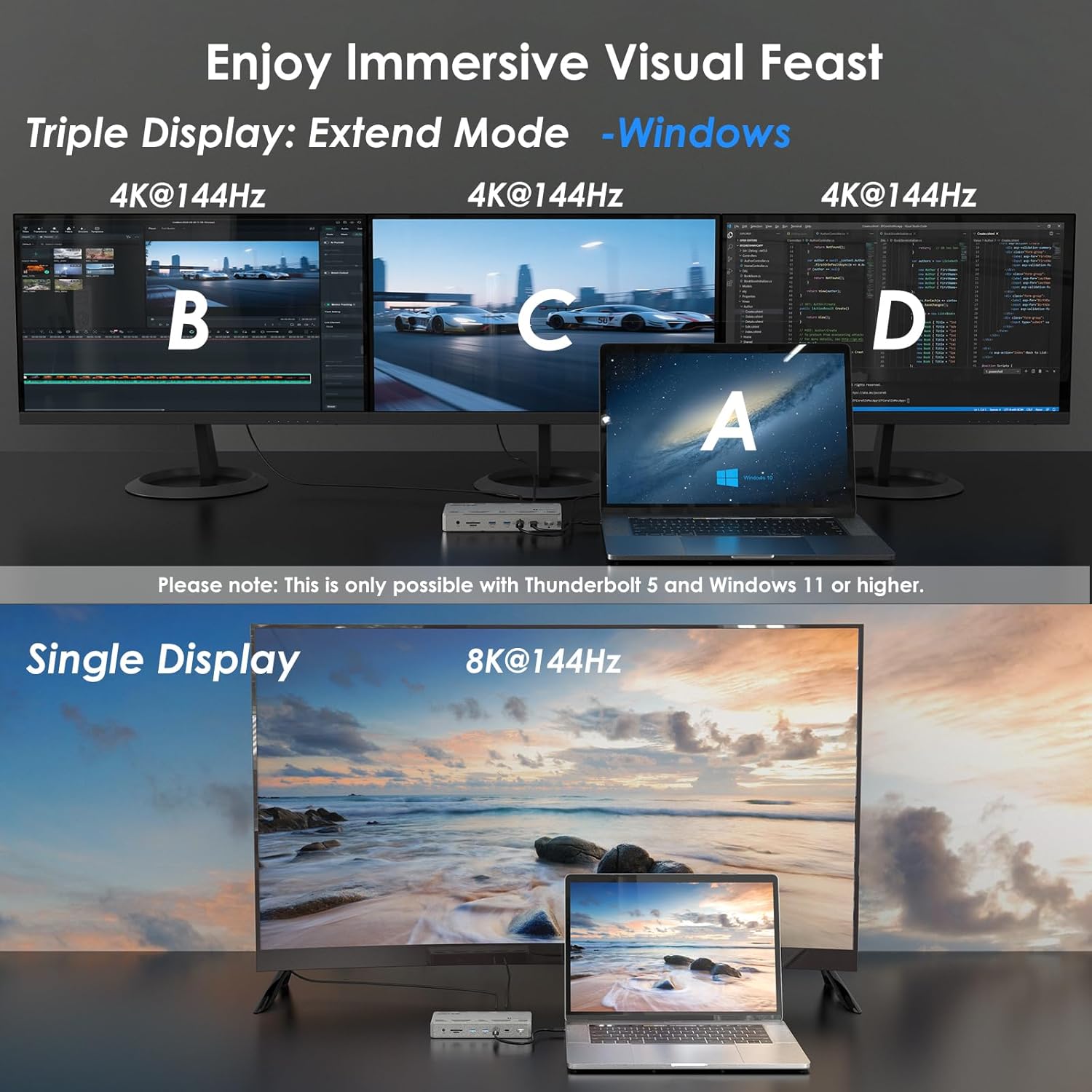
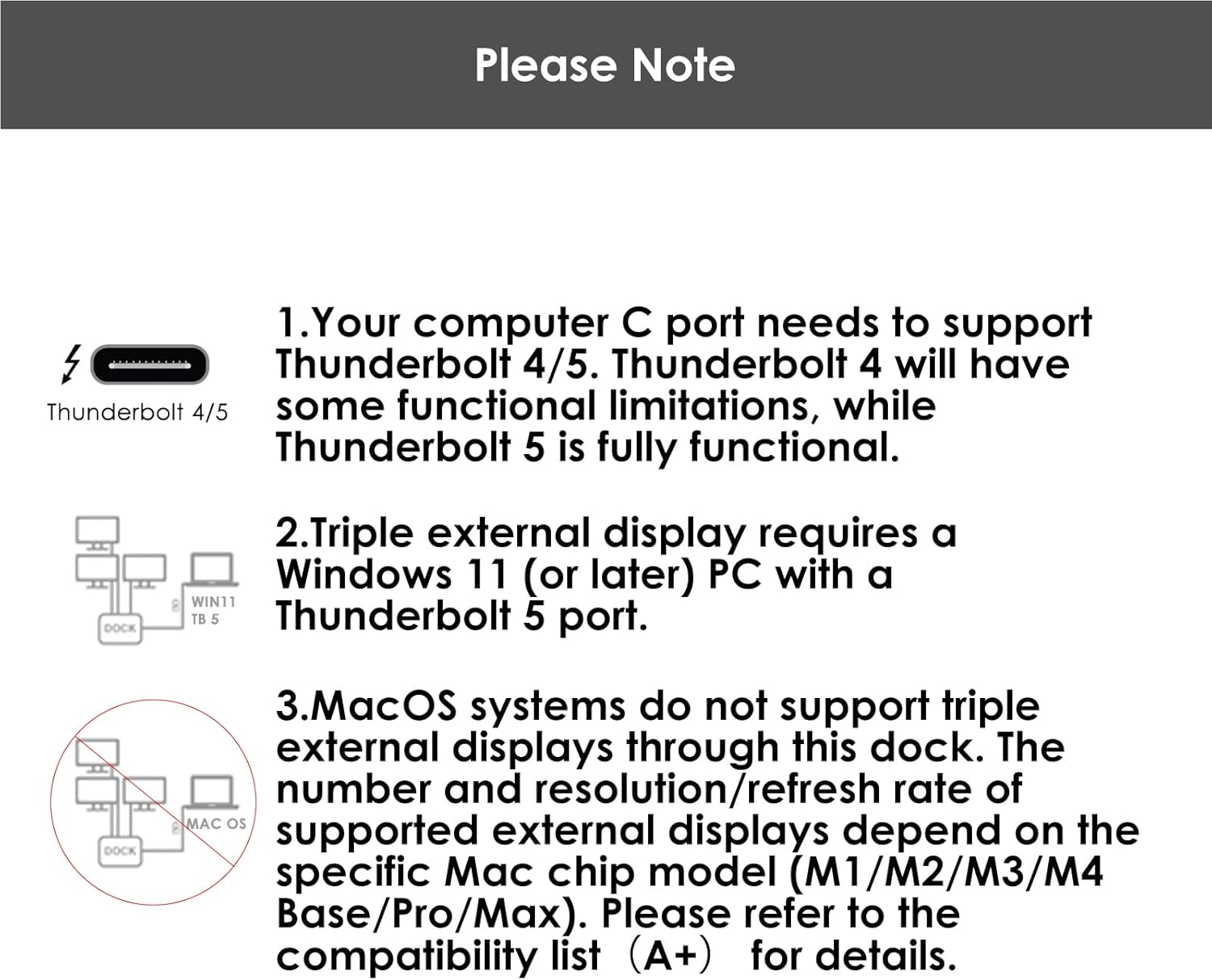
Crazy Expansion Experience – Cool! Single display 8K@144Hz, dual display 8K@60Hz, better and clearer picture quality than in the cinema! Cool! Triple display 4K@144Hz, no delay, no frame drop for stocks, meetings, video production, enjoy the ultimate smoothness and efficiency! Triple external display requires a Windows 11 (or later) PC with a Thunderbolt 5 port. macOS systems just support dual external displays through this dock.
Crazy Transmission Experience – This thunderbolt 5 dock equipped with four thunderbolt 5 ports, the uplink port can provide 140W output power to the computer, and the downlink port can provide 80Gbps data transmission. An integrated SD V4.0 card reader supports blazing-fast speeds of up to 312 MB/s, 2.5G RJ45 Ethernet lightning-fast and lag-free connectivity. No other feeling, just fast, more fast, crazy fast!
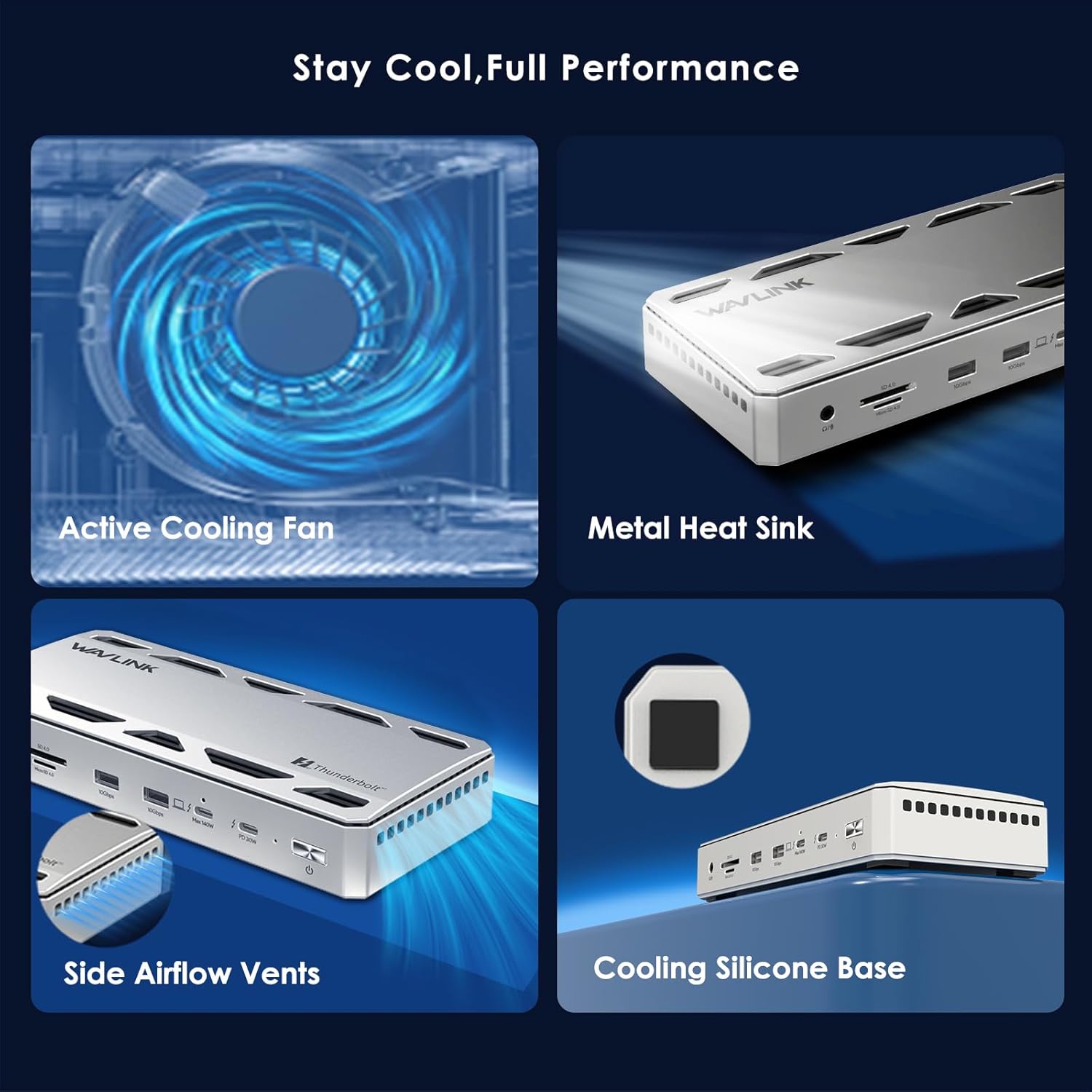
Crazy Exquisite Designs – One Kensington lock prevents theft of the device. Two USB-A are reserved for your wireless mouse and keyboard. Three downstream Thunderbolt 5 ports also offer 15W&30W power delivery to keep multiple devices charged simultaneously. Four anti-slip design to prevent accidental movement.
Note – Your computer C port needs to support Thunderbolt 4/5. The number and resolution/refresh rate of supported external displays depend on the ur devices, please refer to the compatibility list(A+) for details. USB-C to HDMI/DP cables and the security lock are not included. If you encounter any problems, please feel free to consult our technical team.
[
13 reviews for WAVLINK Intel Certified Thunderbolt 5 Dock, 12-in-1 TB5 Docking Station with 120Gbps Max Transfer, 140W PD, 2.5G Ethernet, 4X USB-A 3.2 Gen 2, SD4.0, for Windows 11/Mac OS 14.6 or Later TB5/4 Laptops
Add a review
$299.99
X. Tan –
Solid build, great support – just need to pick the right usb to DP cable
I need to find a dock solution for my windows laptop and my M4 Macbook Air, so both laptops would work with my dual 4K external monitors setup.Windows is relatively straight forward, thanks to its support of MST. Mac is more picky. Since I don’t want to rely on software-based DisplayLink technology, I need to find a ThunderBolt 4/5 based docking station.This is how I landed on this WAVLINK TB5 dock.Upon receiving the unit, I am quite impressed with its build quality: very solid, all metal dock body, combined with a very beefy power adapter.Since it has two TB4 outputs but no HDMI or DP port, I used two Amazon Basics USB-C to DP port cables for the monitor connection. Once everything is plugged in I turned on the MBA, both monitors lighted up. Great!But good luck pretty much stopped there.The next day, when I plugged in the MBA again, one of the monitors refused to come on. After over an hour of troubleshooting, I found one of the USB-C to DP cable was bad, and both monitors lighted up again after I replaced it with a cheap usb-c doc + DP cable combo solution.At the time I thought it was just a bad USB-C to DP cable, until the next day, I found a day after the other USB-C to DP cable also quit working.Two cables failure over a 2-day span definitely indicates the dock is the culprit. Something in dock’s circuit design is frying the cables.——–update 1/7/2026————–This is chapter 2 of my review. The patience, prompt response, professionalism and most importantly the comptency have changed my mind. With their their help, we went through a series of back-and-forth troubleshooting, and finally I can confirm that the culprit is the usb-c to DP cable, not the dock. it turned out with the advanced TB5 ports, you would need a cable AT LEAST with ThunderBolt 3/4/5 support. In my case the Amazon Basics cable unfortunately is not. Everything just worked after I switched to another brand compatible with TB4. Issue resolved!As a matter of fact, during the whole process I also tried a couple of other TB4 docks at the same price point, none beats this WAVLINK TB5 dock in terms of reliability and performance. Notably, this dock has the most practical number of ports available as well.Definitely it’s a keeper!Final note: the number of vine reviews of this product might get people concerned. I just want to make it clear that I paid for this out of my pocket, and the wavlink has offered me nothing to update this review.After all Wavlink has a solid product and excellent support, and they deserve a 5 star.[Attached photos: the dock’s thermo profile when under moderate load, pretty decent]
Daniel Landeros –
One dock to rule them all
Finally, a dock that doesn’t rely on the displaylink drivers, connects reliably every time you plug it in and the refresh rate is fast as well. I have two monitors, a 4k 32 inch 240 Hz monitor, and a 1440p 32 inch 144 Hz monitor. This dock could only go up to 144Hz on both of them but I think that is all you really need for productivity for a Macbook. Also, this dock supported my HDMI to thunderbolt adapter, so I connected my 1440p monitor through the adapter and the dock worked! Not only that, but the ethernet port is a nice edition as well. There are more expensive docks but I think this one really does provide the best bang for you buck.
Joseph Yandow –
“WOW” it’s fast!
This docking does work with desktops, not just laptops, but your desktop must have Thunderbolt 5, not thunderbolt 4, to connect this docking station! If you have a new Alienware Desktop, many are now set up with thunderbolt 5 ports to for 2025 models. The HP model I purchased does, with newest generation i9 processor. With the processor and T5 ports, the docking station works flawlessly and blazing fast. You have to have the T5 cables. The only downside is the cost! Everything related to T5 ports are expensive. Spend a few dollars more and buy the longer T5 cables so you’ll have room to move things around. If the T5s become as obsolete as fast as the T4s did, I’ll end up with another stroke for wasting so much money, but today “WOW” it’s fast!
Anonymous –
Exceeded my expectations
I got this with a 40% off coupon and am surprised at how much I love it! I considered several Thunderbolt 5 dock options, ranging from the most expensive CalDigit TS5 and TS5+ models and also models from UGreen, Anker, and Kensington.I had a modest requirement for ports, and 3 TBT5 outputs seemed to be more than enough. I also didn’t mind that they were all flexible TBT5 ports and not dedicated to HDMI or DisplayPort.I also like that the SD Card reader is not limited in speed as I’ve heard the Anker model is. I was a little worried I wouldn’t like the physical design of this box, but when I installed it on my desk, it looks a lot better than I thought it would.The box itself is beefier than I expected. I like the extra touch of having a cable protector for the main TBT5 input that screws in.I definitely recommend this device. I’ve had no issues with it so far.My setup: MSI Vector 16 laptop with Thunderbolt 5, Lenovo P34WD-40 monitor that I connect via TBT5 to DisplayPort and then daisy chain to a 2nd DisplayPort monitor. I also run 2.5Gbps ethernet in my home office and speeds have been as expected.
CT –
Mostly works but . . .
It took a long time for the ethernet port to be recognized. The ethernet function ceases if/when I link to WIFI. The web site for downloading drives is out of commission – no error messages, just no response when I enter the model number.I may or may not keep this depending on whatever tec support comes up with. Too bad. I was looking forward to smoother ways to get my work done.
Joe964 –
Problem free Thunderbolt hub
Works the best of all the many hubs that I have used
Ryan Patrick Nicholl –
Works perfectly
Works perfectly. I had some compatibility issues with another thunderbolt dock, but this one worked flawlessly.
Harrison B. Greer –
Good value
High build quality. Works seamlessly with my M4 MacBook Pro.
Zalakain –
⚡🔗 Tecnología Thunderbolt 5 de última generaciónLa estación de acoplamiento WAVLINK Thunderbolt 5 Dock 12-en-1 representa uno de los avances más potentes en conectividad moderna. Este dock incorpora la nueva tecnología Thunderbolt 5, diseñada para ofrecer mayores velocidades, mejor eficiencia energética y compatibilidad avanzada. Dispone de un puerto Thunderbolt 5 ascendente capaz de alcanzar hasta 120 Gb/s, además de suministrar 140 W de Power Delivery, suficiente para cargar incluso portátiles de alto rendimiento. A esto se suman tres puertos Thunderbolt 5 descendentes, que permiten añadir pantallas, almacenamiento externo, capturadoras o cualquier dispositivo compatible con velocidades de hasta 80 Gb/s.🖥️🎥 Experiencia de visualización extremaUna de las características más impresionantes de este dock es su capacidad de expansión gráfica. Permite conectar:1 pantalla 8K a 144 Hz para una fluidez total en edición, gaming o diseño.2 pantallas 8K a 60 Hz para usuarios multitarea o profesionales creativos.3 pantallas 4K a 144 Hz, una opción excepcional para quienes trabajan con entornos complejos o setups avanzados.Es importante destacar que la triple pantalla 4K solo es compatible con Windows 11 o superior y dispositivos que integren Thunderbolt 5 nativo. En macOS, el dock admite hasta 2 monitores externos, respetando las limitaciones del propio sistema.🚀📂 Rendimiento extremo en transferencia y conectividadLa velocidad es uno de los pilares de este dispositivo. Gracias a Thunderbolt 5, ofrece un rendimiento espectacular en lectura y escritura con dispositivos externos. El lector SD 4.0 integrado alcanza 312 MB/s, ideal para fotografía profesional. Además, la conexión Ethernet 2.5G garantiza descargas, streaming y teletrabajo sin latencias.Los 4 puertos USB-A 3.2 Gen 2 permiten conectar periféricos de alta velocidad, discos externos o accesorios. El dock también dispone de salida de audio/micrófono de 3,5 mm y una ranura Kensington para añadir seguridad física.🔌🔋 Alimentación optimizada y simultáneaEl puerto Thunderbolt ascendente con 140 W PD puede mantener cargado prácticamente cualquier portátil moderno, desde ultrabooks hasta estaciones de trabajo. Los puertos descendentes proporcionan 15 W y 30 W adicionales, permitiendo cargar móviles, tablets y otros dispositivos sin necesidad de usar cargadores externos. Esto permite mantener un escritorio limpio, ordenado y totalmente funcional.🛡️💠 Diseño y practicidad del día a díaEl dock combina un estilo moderno con una estructura sólida de 610 gramos, lo que le da estabilidad sin dejar de ser portátil. El diseño incluye una superficie antideslizante, perfecto para escritorios donde el movimiento de cables puede desplazar el equipo. Además, dos de los puertos USB-A están pensados específicamente para ratón y teclado inalámbricos, garantizando una señal estable y sin interferencias.📌❗ Notas importantes de compatibilidadPara aprovechar toda la potencia del dispositivo, el puerto USB-C del portátil debe ser compatible con Thunderbolt 4 o Thunderbolt 5. El rendimiento en pantallas y periféricos dependerá también del hardware del ordenador. Los cables USB-C a HDMI/DP y el candado de seguridad no vienen incluidos.📝✨ ConclusiónEl WAVLINK Thunderbolt 5 Dock 12-en-1 es una estación de acoplamiento diseñada para usuarios exigentes: profesionales creativos, editores de vídeo, programadores, diseñadores y cualquier persona que necesite máxima velocidad y múltiples pantallas. Su capacidad para gestionar resoluciones 8K, triple pantalla 4K, alimentación de 140 W y conectividad de última generación lo convierte en uno de los docks más avanzados del mercado. Potente, estable y preparado para el futuro, ideal para transformar cualquier portátil compatible en un auténtico centro de trabajo profesional.
Vilka –
My workstation gained a noticeable boost the moment this hub became part of the setup. Connecting several screens felt smooth and switching between tasks stayed steady even during heavier workloads. File transfers finished quicker than I expected and moving between storage devices required no juggling. Power delivery kept my laptop topped up while everything else stayed connected without drops. The design stayed stable on the desk and cables rested neatly behind it, reducing clutter throughout the day. After extended editing sessions, the system still ran without slowdown and everything remained responsive. The overall experience simply felt more efficient and less cramped.
Mike G. –
Dock worked perfectly for about two weeks and then suddenly would not power on. I tried unplugging and plugging back in, holding down the button to cycle it, but nothing worked. I was going to give it 5 stars because it was otherwise perfect and was a great value.Edit: I started the return process and waited for a replacement to arrive but the Ryzen dock I bought was so much more expensive and ended up being loud ah so I couldn’t live with it. In the meantime, I plugged this one back in and it was working again (maybe needed to discharge?) but it’s been a full week since then and it’s been stable and so far, flawless.Since now I’m reviewing for real, I’ll say that with this dock my 2x 4k monitors wake up almost instantly (compared with 5-10s with HDMI) and it is dead silent. Fantastic Thunderbolt 5 dock at great price. Bringing my rating back to 5 stars.
Hasan –
Ce produit est très pratique si tu veux utiliser beaucoup de ports avec un seul câble. Il permet de charger un ordinateur portable tout en connectant plusieurs écrans, des clés USB, une carte SD et un réseau filaire sans problème, ce qui m’a vraiment simplifié la vie au bureau ou à la maison. Les transferts de données sont rapides et la puissance de charge est suffisante pour des machines exigeantes. J’ai juste trouvé qu’il n’y avait pas de connecteurs vidéo directs comme HDMI ou DisplayPort intégrés, donc il faut parfois des adaptateurs pour certains écrans, et la position des ports n’est pas toujours optimale. Mais dans l’ensemble, c’est un bon choix si tu veux centraliser tous tes périphériques sur une seule station.
Julian –
Ich bin sehr begeistert von der WAVLINK Thunderbolt 5 Docking Station. Sie hat deutlich mehr Potenzial, als mein Laptop nutzen kann. Ich habe lediglich einen 4K-Monitor, ein Audiosystem, ein ATEM (Video/Webcam) und ein Ethernet-Kabel dauerhaft angeschlossen. Außerdem unterstützt mein Laptop „nur“ 85W-Laden und Thunderbolt 4. Sämtliche angeschlossenen Geräte laufen ohne Schwierigkeiten und Einschränkungen.Besonders gut gefällt mir der 2.5Gbps-Ethernetport, da mein gesamtes Heimnetz auf diese Geschwindigkeit ausgelegt ist. Bei einem kurzen Test konnte ich einen Download von 2.2Gbps messen. Das ist ein sehr gutes Ergebnis in meinem Netzwerk. Auch die Ladegeschwindigkeit, die über eine längere Zeit bei knapp über 80W lag, ist wirklich gut.Bei meiner Nutzung wird die Docking Station zwar warm, aber nie ungewöhnlich heiß und den eingebauten Ventilator habe ich nie gehört.Die Anzahl und Aufteilung der Ports finde ich ebenfalls gut. Alle Geräte, die ich dauerhaft angeschlossen haben möchte, konnte ich auf der Rückseite anschließen. Hier hätte ich aber gerne einen der USB-A-Ports gegen einen USB-C-Port getauscht. Da mein Audiosystem aber locker mit 10Gbps auskommt, habe ich mein USB-C-Kabel einfach gegen ein USB-A-Kabel ausgetauscht und das „Problem“ war gelöst. Alternativ wäre auch ein HDMI oder Displayport schön gewesen.Auf der Vorderseite habe ich lediglich meinen Laptop angeschlossen. Die restlichen Anschlüsse sind aber praktisch, wenn man mal temporär eine Festplatte, Speicherkarte oder Kopfhörer nutzen möchte. Auch hier hätte ich keine zwei USB-A-Anschlüsse gebraucht.Die Verarbeitung wirkt auf mich sehr hochwertig und robust. Man fühlt und sieht, dass das Dock aus Aluminium und nicht nur Plastik gefertigt ist.Wie bereits zu Beginn geschrieben, bin ich sehr zufrieden mit der WAVLINK Thunderbolt 5 Docking Station und sie bietet mehr, als ich brauche.