

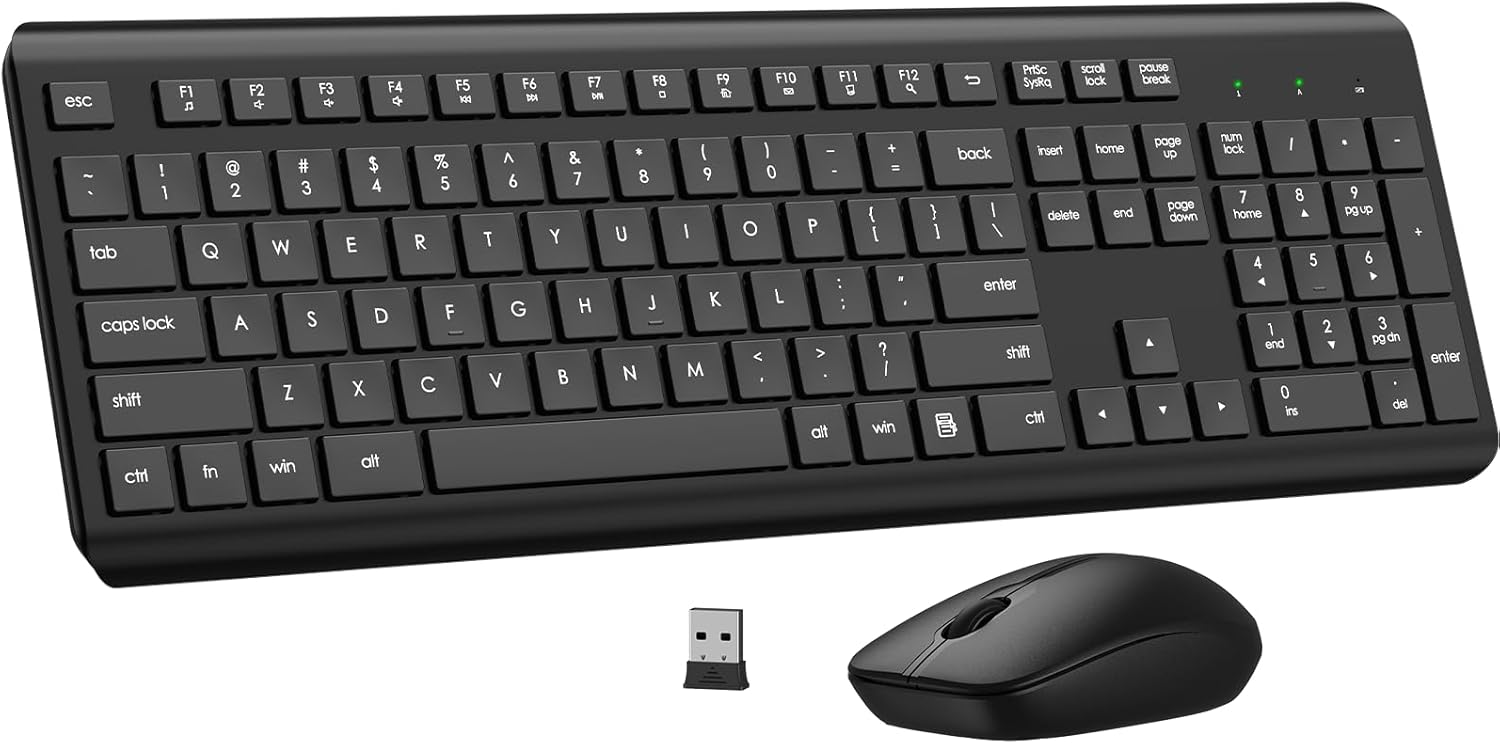
Wireless Keyboard, 2.4G Full-Sized Ergonomic Wireless Computer Keyboard with Wrist Rest for Windows, Mac OS Laptop/PC/Desktop/Notebook(Black)
$19.99
Related Products





Product description


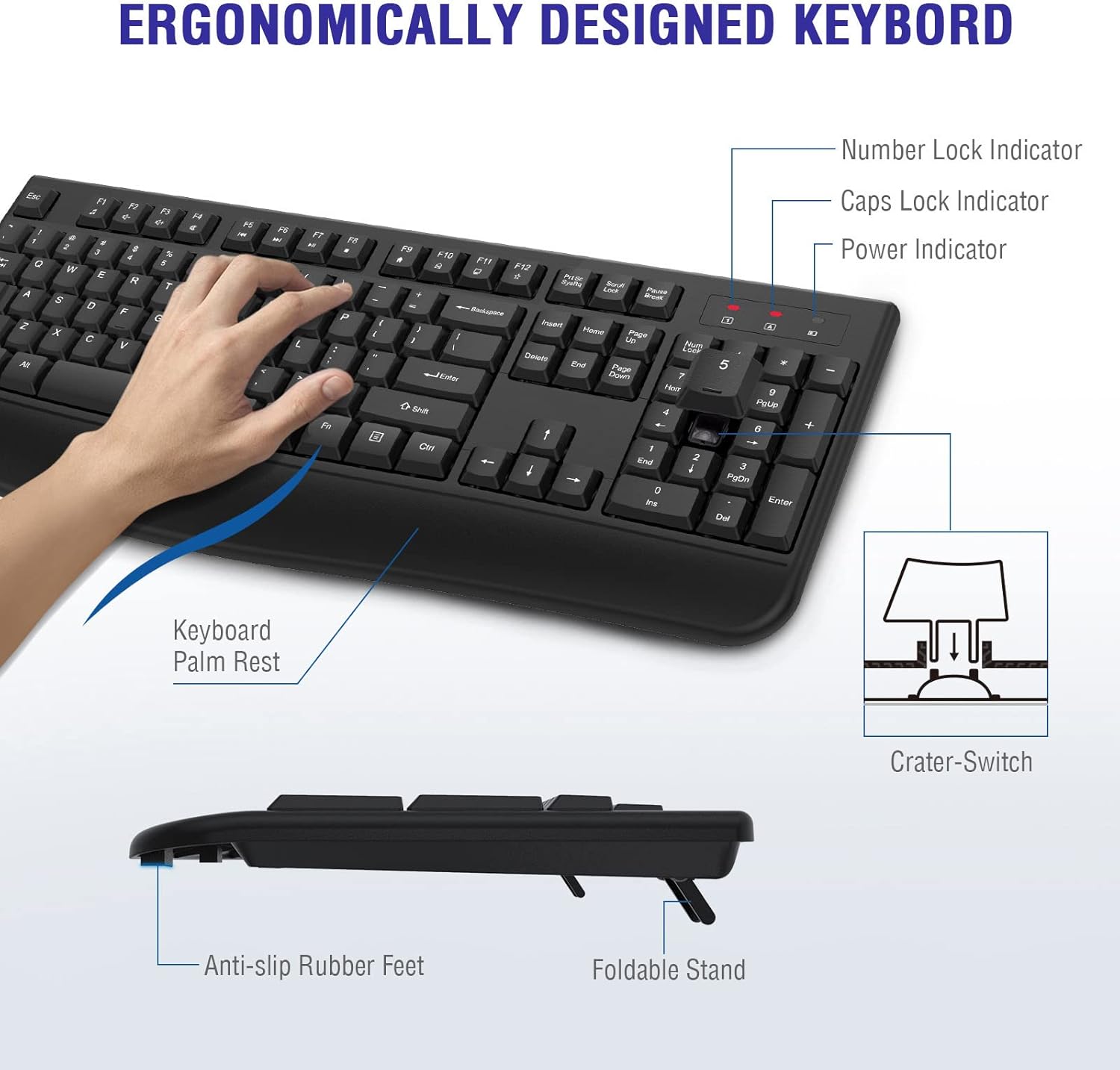
1 Comfortable Palm Rest
2 3 Indicator Lights
3 Plug and Play


Where is the USB receiver?
The USB Receiver is in keyboard battery compartment, you can find it when you open the battery compartment cover.
What functions do the shortcut keys on the keyboard have?
This wireless keyboard with 13 multimedia shortcuts, can provide you with the best entertainment experience.
How long does it take to enter sleep mode? Can I change this mode?
If it is idle for 10mins, the keyboard will enter sleep mode,This mode cannot be changed. Its purpose is to save power and extend the battery life. Simply press any key to wake it up.
What will I receive?
1x Ergonomic Wireless Keyboard
1x 2.4G USB Nano Receiver
1x User Manual
There’s a problem with my keyboard and mouse that I can’t solve, what should I do?
Find the Our support team immediately, we will be 100% responsible for each of our products and customers.
【Plug & Play 2.4G Wireless Keyboard】This wireless keyboard is Plug and play 2.4 GHz wireless provides a powerful and reliable connection up to 33 feet(10m) without any delays. Note: The USB is in the battery compartment of the keyboard, you can find it when open the keyboard battery cover.
【Smart Power Saving Function】This wireless keyboard has auto-enter power saving function. When you stop using the keyboard more than 30 minutes, it will enter sleep mode respectively to save power. This feature greatly extends the battery life, you can click any button to activity the device.
【Wireless Keyboard with Comfortable Palm Rest】This wireless keyboard is ergonomically designed with comfortable palm rest and folding holder that can keep it at an optimum slope,prevent your wrists from hurting while long sessions of typing. Keyboard is also designed with anti-slide pads so it can stay in place when you’re typing quickly.
【Full Size 104 Keys Wireless Keyboard】This wireless keyboard uses the classic 104-key design with number pad, there are Number Lock indicator/ Caps Lock indicator/ Power indicator in the upper right corner of the keyboard, the bottom of the keyboard is equipped with an adjustable stand.
【Universal Compatibility & 12 Months After-sales Service】This wireless keyboard and mice combo compatible with windows XP/Vista/7/8/10/X, Mac and other operating system. Works well with desktops, Chrome-book, PC, Laptop, Computer and more.
[
10 reviews for Wireless Keyboard, 2.4G Full-Sized Ergonomic Wireless Computer Keyboard with Wrist Rest for Windows, Mac OS Laptop/PC/Desktop/Notebook(Black)
Add a review
$19.99
M. Bailey –
Comfortable, Reliable, and Easy to Use
I’m really impressed with this wireless keyboard. It connected quickly with zero hassle, and the 2.4G connection has been consistent and reliable — no lag or random disconnects. That alone makes a huge difference when you’re working all day. What I love most is the ergonomic design and built-in wrist rest. It feels comfortable and supportive, especially during long stretches at my desk. The keys have a nice response — not too loud, not too soft — and the full-size layout with the number pad makes it easy to stay productive. Overall, this keyboard delivers exactly what it promises: comfort, performance, and simplicity. Great value for the price.
Amazon Customer –
Great buy! Easy to setup. Easy to use! Great functions! Excellent! Highly recommneded!
My wife and I bought this amazing keyboard yesterday, and it arrived early this morning. It is easy to set up: just remove the plugged-in cord of the old keyboard and insert the USB receiver into one of the computer’s ports (plug-in spaces). (If you’re using a PC and it’s a tower type, the ports are in the back of the computer.) (The USB receiver is included with the keyboard. (It is in the battery compartment in the underbelly of the keyboard,) Then, install a AA battery (not included) in the battery compartment, and you’re ready to go!The no-slip QWERTY keyboard is well-designed, with rear “feet” that allow it to be tilted slightly forward. The keys have a bit of a “bounce” to them, which facilitates typing, and, of course, the keyboard includes all the function keys as well as the alphanumeric keys.In addition to their normal functions, the function keys allow users to increase or decrease volume, mute the volume, select tracks, play, pause, or stop a track, access a browser, access e-mail, and perform other special functions (check the tiny user’s manual that comes with the keyboard). (The icons on the keyboards, under the function numbers,My wife and I are very happy with this product and recommend it highly!
Kelly L. –
White wireless keyboard.
Works well, easy to connect. Would recommend.
JD Grey –
Not a bad keyboard
I like this cordless abilities of this keyboard. It works well, is lightweight (for lap use) and does what it’s supposed to. However two items that bug me. First, You have to press the spaceebar (or I suppose any key) to get it to wake up. First world problem I know but I always forget and end up cutting of the beginning of words. 2nd…there is no way to turn it off. No switches. Nothing. It must got to sleep after a pre determined time. But that’s not enough to give it less than four stars. Works well. Connected right away and worth the price.
Kathy Gaines-Still –
Nice keyboard
Connection easily, its comfortable to use.
vernon shelton –
Great keyboard.
Love this keyboard. Very comfortable to use. Keys make for smooth typing. Very quiet. Would buy again.
Zon is the place! –
The best keyboard I’ve ever bought and used.
My favorite keyboard. I’ve had more keyboards over many years than I can count. I’m an old guy. Been using a PC desktop type computer for many decades. This is the best keyboard I’ve ever bought and used. It’s fantastic.
Michelle Montgomery –
Keyboard already failing under 2 months
I’m a fast typer and super busy lately work from home so took me awhile to figure out what was slowing me down on this keyboard. But finally analyzing the new feel of this thing it turns out that there’s likely a loose connection somewhere that turns the CAP Lock on. So frickin’ annoying! It’s not my typing either. I’m fine when I go into the office. Too late to return. Really annoying to get this basic technology wrong. Going thru same with new coffee maker. Basic stuff done cheaply is just filling our land fills. Should be against the law and hold these makers accountable!
Marie Anne –
I upgraded my desktop computer, with a larger white Samsung smart monitor on my desk, and it is always nice to match it up with the same color keyboard. Also having a brand new clean and dust free keyboard is a nice upgrade.
Excelente producto, fácil de armar y es verdaderamente cómoda –
Es silencioso y bastante cómodo, es excelente para su precio, el único defecto que he notado es que no tiene interruptor de encendido/apagado, pero de ahí en fuera realmente lo recomiendo si se busca alguna opción económica, estética y funcional. Tengo otros teclados (muchísimo más caros) en casa, y puedo decir que éste es mi favorito.