
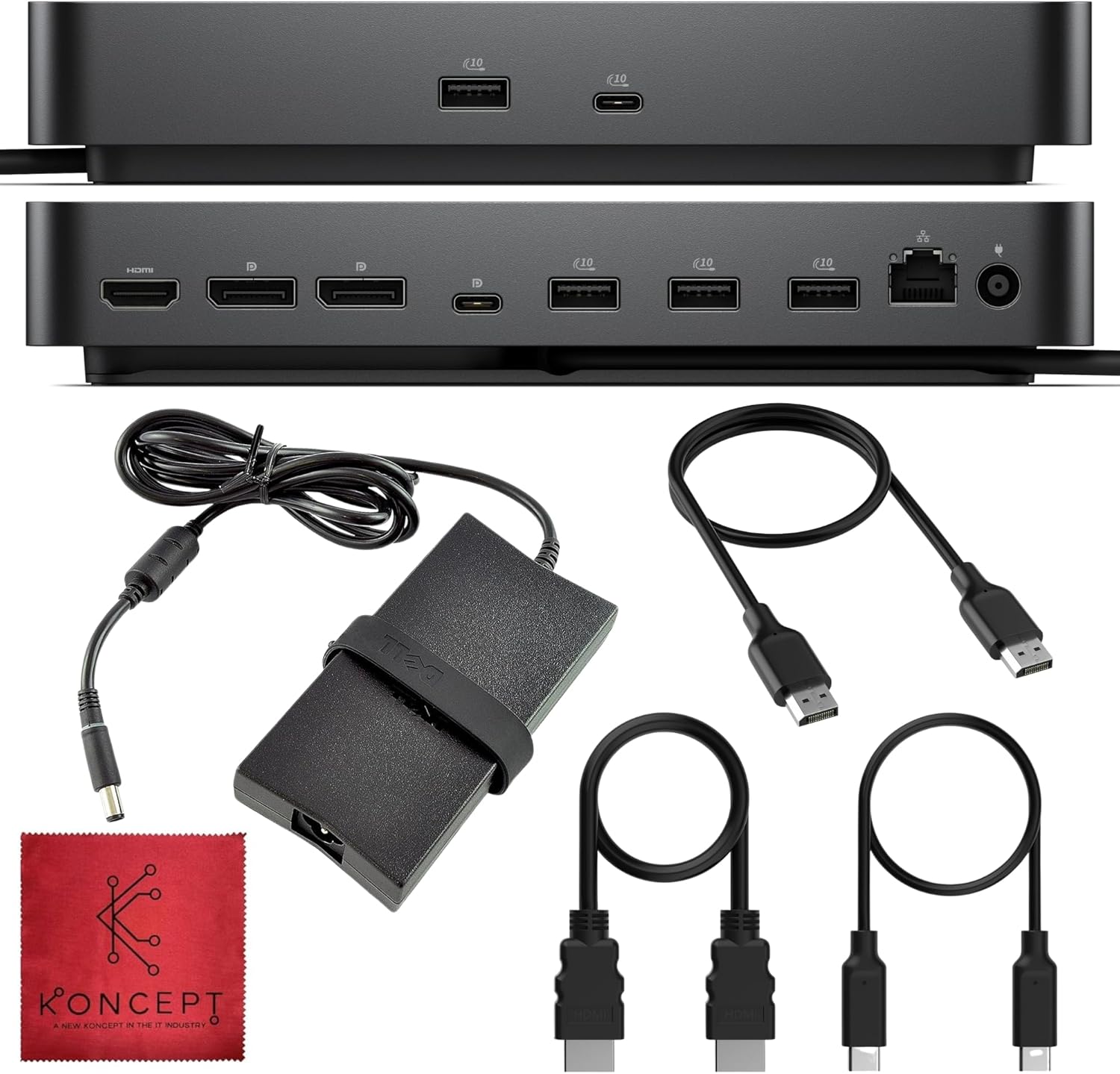
WD25 Dell Pro Dock USB-C Docking Station – with 100W Power, Dual 4K Display Support, HDMI, DP & USB-C Cables – 3 Year Warranty
$197.99
Related Products




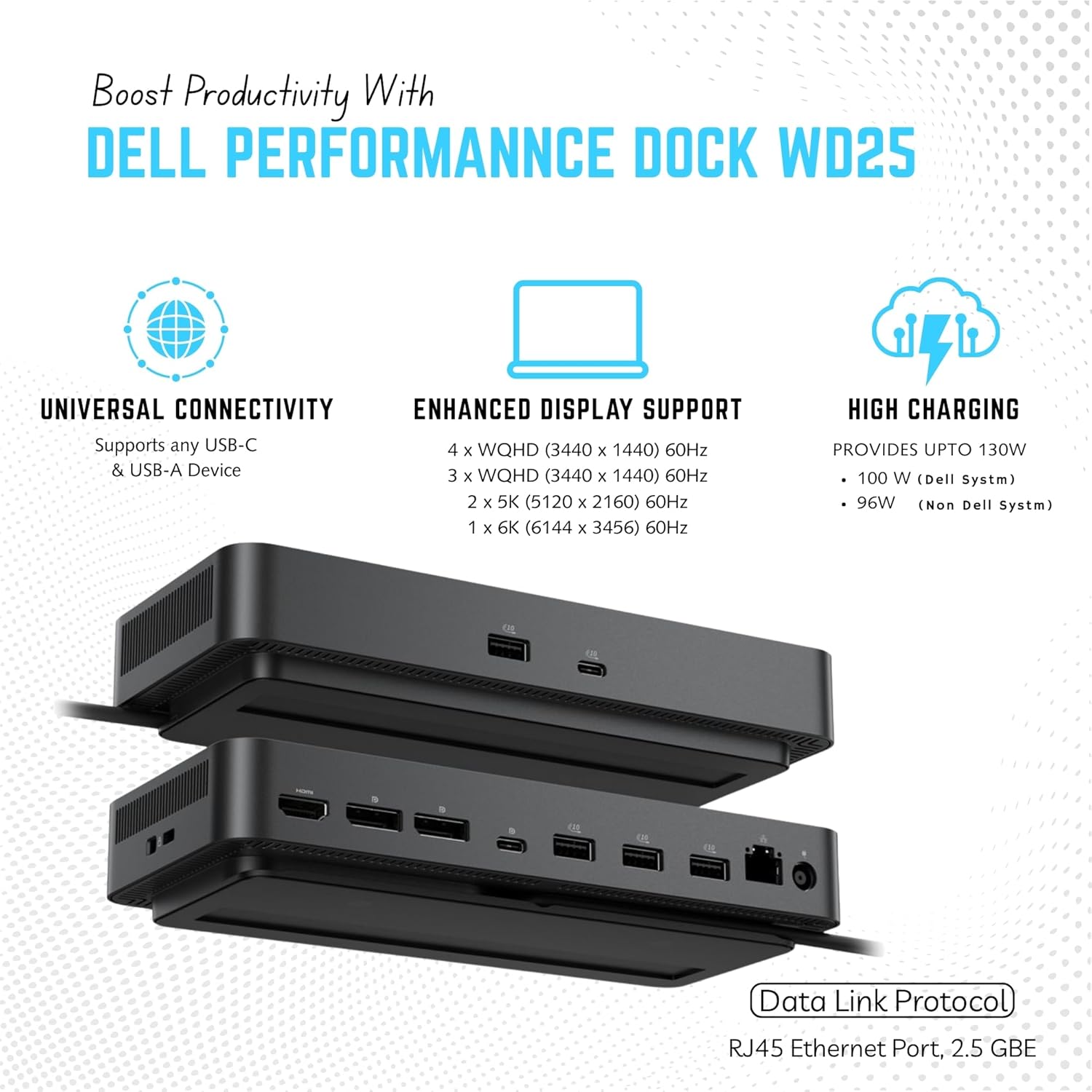





Product description


Model WD 25 Video ports One USB 3.2 Gen2 (10 Gbps) Type-C with DisplayPort 1.4 Alt Mode (MFDP or Multi-Function Display Port), Two DisplayPort 1.4 ports, One HDMI 2.1 port External displays supported Up to four USB Type-A ports Four USB 3.2 Gen2 ports USB Type-C ports One USB 3.2 Gen2 Type-C port ● One USB 3.2 Gen2 Type-C with DisplayPort 1.4 Alt Mode port Docking cable length 0.9 m Power delivery 100 W to Dell computers with 130W, 96 W to Non-Dell computers with 130W System requirements Compatible with USB Type-C Thunderbolt computers and USB Type-C computers with DisplayPort Alt Mode Power button function Sleep/Wakeup/Power button Operating systems Windows 10, Windows 11, Ubuntu 24.04, 64-bit, Red Hat Enterprise Linux (RHEL) 9.6 + ChromeOS 137 Front USB 3.2 Gen 2 port 4.5 W Front USB 3.2 Gen 2 Type-Cport 15 W Rear USB 3.2 Gen 2 ports 4.5 W Rear USB 3.2 Gen2 Type-C port 7.5 W Weight (lb) 1.28 Input frequency 50 to 60 Hz
Is the Dell WD25 compatible with all laptops?
Yes, it supports most laptops with a USB-C or Thunderbolt 3/4 port that provides DisplayPort Alt Mode and Power Delivery. Works best with Dell laptops but is also compatible with HP, Lenovo, and MacBook models.
Can the dock charge my devices even when my laptop is disconnected?
Yes, the WD25 can charge phones or USB-powered accessories even if your computer is not connected — as long as the dock’s AC adapter is plugged in.
A hardware installation window appears when I connect the dock. Is that normal?
Yes. When first connected, Windows automatically detects the dock and installs drivers. This is a normal plug-and-play setup process.
My connected devices stop working after a power loss. What should I do?
Disconnect the dock’s AC power for a few seconds, then reconnect it. This resets the power contract between your laptop and the dock.
What if my displays don’t detect or flicker?
Check that your laptop supports DisplayPort Alt Mode, ensure firmware is up to date, and use the original Dell cable and adapter supplied with the dock.
[All-in-One Connectivity] – Enhance your workspace with versatile connection options — includes 1x HDMI 2.1, 2x DisplayPort 1.4, and 1x USB-C multi-function display port.
[Powerful Charging Performance] – Supports up to 100W power delivery for Dell laptops and 96W for other USB-C devices
[Ultra Fast Networking] – Stay connected with the built-in 2.5GbE Ethernet port, offering faster, more stable, and secure wired internet connections compared to standard Gigabit ports.
[Multi-Port USB Hub] – Includes 4 x USB-A 3.2 Gen 2 ports and 1 x USB-C 3.2 Gen 2 for fast data transfer and powering peripherals.
[
5 reviews for WD25 Dell Pro Dock USB-C Docking Station – with 100W Power, Dual 4K Display Support, HDMI, DP & USB-C Cables – 3 Year Warranty
Add a review
$197.99
ReviewersAnonymous –
Everything I need for a two-monitor setup
If you are not familiar with Amazon Vine, it is basically Amazon trading free* products for honest reviews. I do my best to make my reviews honest, real and value-oriented as if I had paid for each items I receive.* These items are not totally free as Vine members pay income tax on the items they receive. I only mention this because we Viners do have some skin in the game for each item we order.Why I ordered this item: I needed a dock for my work setup that could handle two monitors and charge my laptop at the same time. I have a Dell XPS 15 and wanted something that could deliver enough power so I don’t have to plug in the power brick separately.Likes:* The 100W power delivery is enough to charge my laptop while running both monitors and external drives. I don’t need to mess with the laptop charger at all.* I’m running two 4K monitors at 60Hz through the DisplayPort connections and everything displays perfectly.* The 2.5GbE ethernet port is faster than the gigabit port on my old dock.* Build quality feels good. The dock is heavy and the ports are all tight with no wiggle. The included cables are thick and well-made.* The price from this seller was about $40 less than what I saw on other sites for the same model.No likes:* The fan inside the dock is audible when its under load. It’s not loud, but I can hear it when the room is quiet and I have both monitors running plus charging the laptop.Would I pay full price for this product: YesFinal thoughts: This dock does everything I need for my two-monitor setup and the power delivery means I only need one cable to my laptop. The ethernet speed boost was a nice bonus I wasn’t expecting.
Vine –
A total transformation for my home office
I thought the setup for this Dell Pro Dock WD25 would be a nightmare or that the dual 4K display support would require a stack of extra drivers. After a few days of the box sitting on my desk, my spouse finally helped me cable-manage my monitors and workstation to get the whole desk synced up. The reality of what actually happened was a total relief because the plug-and-play design recognized my screens instantly, and the unit feels much more substantial and grounded than the lightweight travel hubs I’ve used in the past that usually slide around.Since we have two kids who are always needing to plug in their tablets for a quick charge, having the 100W power delivery is a huge help in our busy household. The variety of HDMI, DP, and USB-C connections provides a specific, high-bandwidth environment for my large file transfers and video calls without any lag. There is a satisfying, solid feel to the ports when you plug in a cable, and the included 3-year warranty is high-quality peace of mind for a professional setup.The connection to my laptop is remarkably smooth every single time. Even though it is a powerful WD25 station, the heat dissipation is excellent and it stays cool to the touch. To answer the real-world utility question, the internal hardware is quiet and efficient, so I can finish my late-night reports without making enough noise to wake a teenager sleeping in the next room.
Alex –
Great performance
This is a quality Dell dock that performs exactly as expected. I purchased it as an open box item, and everything arrived in like-new condition, including the accessories.In terms of value, it is about average. Even as an open box unit, it is priced similarly to some newer versions of this dock, so it is not the best deal out there, but still reasonable for what you get.Performance has been excellent. It handles my dual 4K60 monitors without any issues, and everything syncs immediately when connected. The 100W power delivery is strong enough to keep my system charged even during more intensive workloads. This is plug-and-play and easy to set up.All of the ports, including Ethernet, were detected instantly and ran at full speed without needing to install any additional drivers. Connections have been fast and reliable across the board.Overall, this is a dependable, high-quality dock with solid performance. Even if the value is just average, it delivers where it matters most.
Customer Review –
Essential for a dual-display setup
This docking station is fantastic, and I use it with my MacBook. Having everything connected through one dock is extremely helpful. A great part of this is that it comes with all the cables needed, plus a microfiber cleaning cloth, which is a very nice touch!I created a dual display with 2K resolution (not 4K), and I have not had any issues with flickering or random drops or displays on either of my dual monitors. My dual monitors have performed beautifully with no issues. This docking station is very quiet and does not get hot. It warms up a bit, which is totally normal for a docking station. I am just happy that it is very quiet. So far, it has been a reliable, easy-to-use docking solution that helps create a very clean and simple desk space!
cannabible customer –
Great for adding lots of accessories to the laptop
I got this for 1 of my Dell laptops that generally stays at home, but I do take this with the laptop for those uncommon time I do on-site work and need to bring a laptop. This works well and reliably so far. I’m not noticing any major lag or connection problems. This makes it easy to hook up monitors, speakers, and other accessories somewhat quickly. It’s plug and play and doesn’t need drivers. This is definitely useful for those that use a laptop for business or gaming but don’t want to keep the laptop hooked up all the time like an old tower desktop. Regular laptops almost always have a severe lack of ports, so this adds much needed ports/accessory capacity, as long as you get the separate cords. It may seem pricey on paper, but this thing is great, so very much worth the price.